
Integrated Audio Descriptions
Introduction
When creating video lectures or other media for courses, describing what’s on your screen out loud (e.g., a chart, a diagram, an equation) does more than help make your videos accessible. It helps all students learn. Research on multimedia learning shows students understand and retain more when instructors describe and clearly explain visuals on screen (Mayer, 2021).
Building description into your narration as you record is also one of the easiest ways to meet accessibility requirements—this is known as an integrated audio description. Under current accessibility standards, video with meaningful visual content needs audio description, and narrating as you go can satisfy that requirement without a separate production step.
This isn’t an additional skill you need special software for. It’s a habit: describing what’s on screen the same way you’d explain it to someone on the phone who couldn’t see your slides at all.

Understanding Web Content Accessibility Guidelines (WCAG)
Under Title II of the Americans with Disabilities Act (ADA), federal regulations establish accessibility requirements for web content and mobile apps provided by state and local governments, using WCAG 2.1 Level AA as the technical standard. This includes Level A criteria, such as Success Criterion 1.2.5, which requires that visual information have an audio description.
A Closer Look
Good audio description doesn’t happen by accident. It comes from a few specific habits you can build into how you present. Here’s what to practice.
Narrate as You Record
An easy way to provide audio description is to describe visuals out loud in the moment you’re presenting them, not to go back and patch in descriptions afterward. As you write on the board, click through a slide, point to a diagram, or work out equations, say what you’re doing and what it shows.
Know What to Describe
Not everything on screen needs a full description. Meaningful content, like a graph, diagram, or map, should be described in enough detail that a student could understand it without seeing it. Decorative content, like a background image or a design flourish, doesn’t. This practice has a side benefit: narrating out loud can reveal slide clutter you’d otherwise miss. If you never mention something while presenting, consider asking yourself whether it needs to be there at all.
On-screen text falls into its own category: read it aloud rather than just gesturing at it. All information on a slide—including titles and instructions—should be read aloud. You don’t need to read it word-for-word unless it’s a direct quotation, but give at least as much detail out loud as you’re showing on screen.
How much detail a visual needs also depends on your teaching point, not just the visual itself. The same chart can call for a different description depending on what you want students to take away from it.
Same Chart, Different Context
Here are two ways to describe the following chart depending on the context:
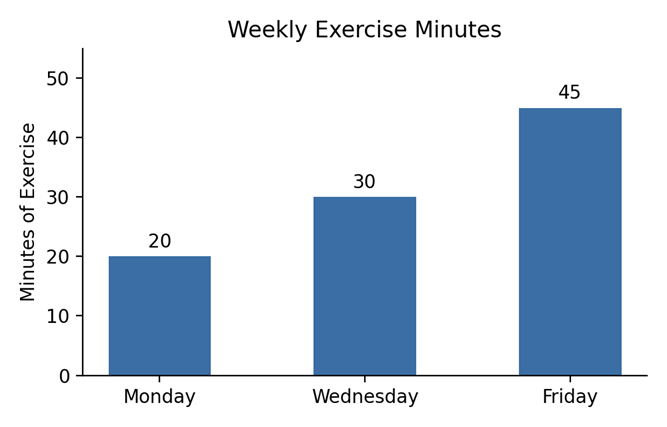
- If the lesson is about spotting a trend: “This chart shows exercise minutes rising steadily across the week—more than doubling from Monday to Friday.”
- If the lesson is about the rate of increase: “The bar chart shows exercise minutes increased by 50% at each check-in—from 20 to 30 minutes, then 30 to 45 minutes.”
Watch Your Language
A few small habits can quietly undercut even a well-intentioned description. Avoid “as you can see” or “the red line shows.” Phrases like these assume a visual reference that may not be apparent or accessible to students.
Be specific instead of vague. Swap out “this” and “that” for what you actually mean, and don’t rely on color alone to carry meaning. Say what something is, not just what color it is.
The video examples below from BCCampus Accessibility Bites provide a contrast between good and bad use of descriptive language.
Additional Resources
- Audio Descriptions from the University of Wisconsin-Milwaukee
- Digital Accessibility at Universities of Wisconsin
- Does This Video Need Audio Description? from the University of Maryland, Baltimore