Online Course Structure
Introduction
Most online courses are delivered through a learning management system (LMS) such as Blackboard, Canvas, Moodle, or D2L Brightspace. While each platform looks a little different, they all offer similar core tools—and students quickly come to expect a consistent structure across their courses.
Whether you teach returning adult learners, traditional-aged students, or a mix of both, clarity and consistency are key. Most online courses follow a structure designed to help students stay organized, manage their time, and stay engaged.
Common tools in an LMS course include:
- Modules (or course content area): The central hub where students access readings, videos, and other materials
- Course calendar and checklists: Tools that help students plan and stay on track
- Discussion forums and video/messaging tools: Spaces for interaction, both asynchronous and real-time
- Assignments and quizzes: Areas where students complete and submit their work
- Rubrics and grading tools: Guides that clarify expectations and support transparent evaluation
Each of these elements works together to create a clear and predictable course.
A Closer Look
Course Organization
Most online courses are organized into modules, units, or weeks, which act as the course “roadmap” in the LMS. Students will return to this space (the content area) frequently, so a clear, consistent structure reduces confusion and supports their success.
Syllabus and Course Introduction
Most courses begin with a syllabus module, which often includes:
- Course overview and expectations (including how and when to communicate)
- Instructor introduction (bio, contact information, and often a short video)
- Required materials (textbooks, articles, or other resources)
- Course schedule or calendar
- Grading policies
- Accessibility and technology support information
- Additional policy sections, such as an AI policy or an academic integrity policy
- Additional information about available campus resources, such as writing centers or library resources
Module or Lesson Design
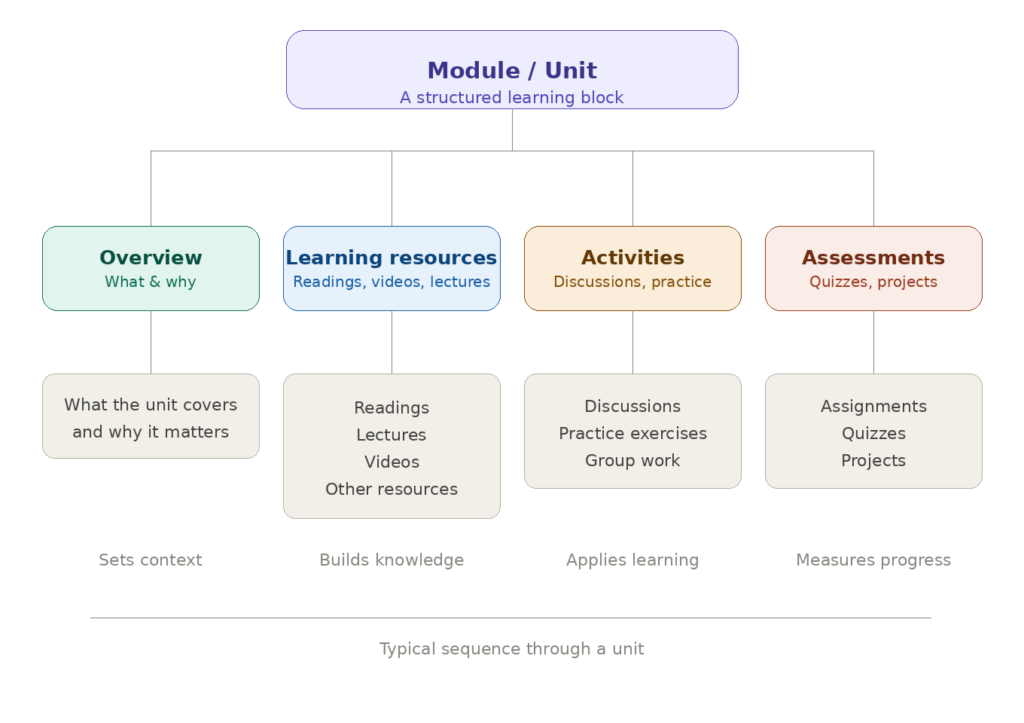
After the syllabus and introductory modules, most courses follow a consistent structure for each module or lesson. This helps students navigate the course. Here are the elements in a typical module:
- Overview: What the module covers and why it matters
- Learning Resources: Readings, lectures, videos, or other materials that students should read or watch for that module
- Activities: Discussions, practice quizzes, or interactive exercises
- Assessments: Assignments, quizzes, papers, or projects
Some instructors structure their courses around the course textbook, aligning each module with a chapter; however, you don’t need to follow a single resource exactly. Instead, use your primary course materials (whether a textbook, articles, or multimedia content) as a helpful starting point, and consider your learning objectives first and foremost.
Backward Design
When structuring a course, one important aspect to consider is backward design. To backward design your course, you start by identifying your learning objectives: what do you want students to know or be able to do by the end of the course? After identifying your objectives, you then design your assessments to measure those objectives and choose activities and materials that prepare students for those assessments. This ensures every part of your course supports your goals and helps students stay focused on meaningful learning.
Additional Resources
- Designing Online Learning in Higher Education by Martin and Bolliger in the Handbook of Open, Distance and Digital Education (2023), Springer
- Online Course Design Best Practices from the University of Rochester
- Ten Online Course Structural Components to Support Learning by Faculty Focus