
Accessible Quizzes
Introduction
Creating accessible quizzes helps ensure that all students have an equitable opportunity to demonstrate what they know. The way you write questions, format answer choices, and present images, graphs, diagrams, and other visual information can affect whether students can understand and complete an assessment.
Thoughtful design can reduce barriers while maintaining the same learning goals and academic expectations for everyone. This is especially important in STEM courses, where assessments may rely on complex visuals, data, equations, and other specialized content.
A Closer Look
Creating accessible quizzes involves more than selecting a question type or adjusting quiz settings in Canvas. The content and formatting choices you make within each question can affect whether students can understand, navigate, and complete a quiz successfully.
Use Clear Formatting and Question Structures
Students should be able to understand what each question is asking without having to interpret complicated formatting or unclear directions. Consistent question structures and straightforward language help students focus on demonstrating what they know.
You can support this recommendation by:
- Writing concise questions and avoiding unnecessary wording.
- Providing clear directions for each question type and using a consistent structure for similar questions.
- Using headings, lists, and spacing to organize longer quiz questions.
- Avoiding all caps, excessive formatting, or unusual symbols to emphasize information.
- Explaining how students should respond when question formats may be unfamiliar.

Fill-in-the-Blanks
When creating fill-in-the-blank questions, use words to identify where students should enter their response rather than relying on visual cues such as a line of underscores. This can make the question clearer for students using screen readers and for students who may not see the visual formatting as intended. The goal is to clearly communicate where and how students should respond. For example: “The capital of Wisconsin is [blank].”
Make Images, Graphs, and Visual Information Accessible
Images, charts, graphs, and diagrams can be an important part of quiz questions, especially in courses that rely on visual information. Students who cannot see an image, however, need another way to access the information they need to answer the question.
You can support accessible images and other visual content by:
- Writing alt text that provides the information students need to answer the question without giving away the answer.
- Providing a longer description, data table, or separate accessible document when a graph, chart, or diagram contains more information than can be effectively included in alt text.
- Making sure images are clear, high quality, and large enough to view.
When creating quiz questions, consider whether the image itself is part of what you are assessing. If students are expected to interpret a graph, the alt text should provide access to the information they need to analyze it without answering the question for them.
For example:
- Less effective: “Graph showing the reaction reaches equilibrium at 40 seconds.” This gives students the answer.
- Better: “Line graph with concentration (mol/L) on the y-axis from 0 to 1.0 and time (s) on the x-axis from 0 to 100. The curve rises steeply at first, then levels off.” This describes the relevant information without telling students what the graph means.
Complex Visuals in STEM
For complex visuals, such as scientific diagrams, maps, financial charts, or statistical graphs, providing the information in a separate, accessible format is often the easiest option for both students and instructors.
Here is an example of a complex STEM image and its alt text and data table:
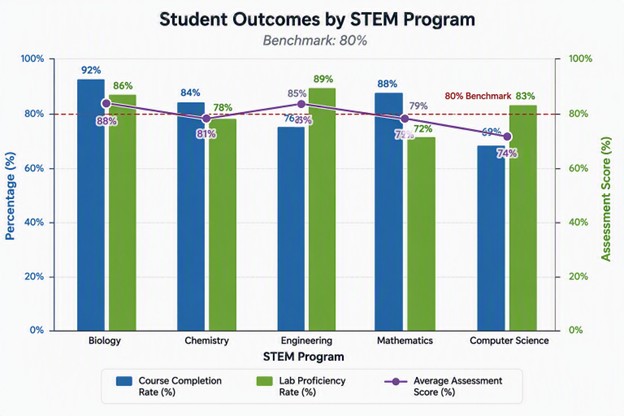
Alt Text: Combination chart comparing course completion, lab proficiency, and average assessment scores across five STEM programs against an 80% benchmark. A complete data table and summary follow the chart.
| STEM Program | Course Completion Rate (%) | Lab Proficiency Rate (%) | Average Assessment Score (%) |
|---|---|---|---|
| Biology | 92 | 86 | 88 |
| Chemistry | 84 | 78 | 81 |
| Engineering | 76 | 89 | 85 |
| Mathematics | 88 | 72 | 79 |
| Computer Science | 69 | 83 | 74 |
The benchmark line on the graph is 80%.
Accessibility Checklist for STEM Quiz Questions
If you teach a course in a STEM field, consider downloading this checklist to help you keep track of accessibility considerations in your quizzes and exams.
Create Accessible Answer Choices and Response Options
The way you format answer choices can affect how students using assistive technologies experience a quiz. Canvas provides built-in question types, but the content you add to those questions still needs to be designed carefully.
You can support accessible answer choices by:
- Avoiding answer choices that rely on visual placement, such as “choose the answer on the right.”
- Keeping answer choices consistent in length and structure when possible.
- Avoiding unnecessary symbols, abbreviations, or special characters.
- Writing answer choices that make sense when read aloud by a screen reader. Ask a colleague to listen as you read the question and answer choices aloud. Do they make sense alone without relying on outside information?
- Following best practices for any visual information provided in the answer choices as well.
Accessibility is an ongoing part of designing assessments. Reviewing and improving your quizzes over time can help ensure that accessibility barriers do not prevent students from demonstrating what they know. This is especially important in STEM courses, where quizzes may rely on graphs, diagrams, equations, charts, and other visual information. Making these materials accessible can help ensure that everyone has access to the same information and learning opportunities while maintaining the same learning goals and academic expectations.
Additional Resources
- Accessibility in Action: Classic and New Quizzes from UW-Eau Claire
- Canvas – Creating Accessible Quizzes in Canvas from the University of Colorado Boulder Office of Information Technology
- Data Tables and Summaries from Digital Accessibility @ UW–Madison